All the COUNT Functions in Excel

When it comes to reporting and analysis, the COUNT functions in Excel are a necessity. Very often we need to export reports from a CRM. It could be a report on clients, on open tasks or service activities like below and we need to do analysis and create summary reports with it: In this article […]
Easiest Way to Understand VLOOKUP in Excel

What is VLOOKUP in Excel? How do you use it? And when should you use it? In this article, we will go through all that. And in the end we will also go through common errors you could get with the VLOOKUP function. What is VLOOKUP in Excel? (And its limitation) VLOOKUP is a built-in […]
How To Set Up A Searchable Dropdown List?

In the Dropdown List in Excel article, we went through the basics of setting up a dropdown list in Excel. This time we will go through how to make a searchable dropdown list and we will also sort the list in alphabetical order so it is easier to search through the list. And then at […]
How to Password Protect an Excel File

This is a step by step guide on how to password protect an Excel file. Apart from setting password for the whole workbook, we will also walk through how to restrict access (with or without password) for specific worksheets and even specific cells. First it is important to distinguish the difference. With setting a password […]
How To Identify Duplicates in Excel

What is a simple way to identify duplicates in Excel? In this article, we will go through two ways of doing that: using Conditional Formatting and COUNTIF function. And at the end we will look at how we can find the total number of unique values in a list. Finding Duplicates with Conditional Formatting The […]
Why Is Excel Showing the Formula Instead of the Result?

There could be a few reasons why Excel is showing the formula instead of the result. First of all, all formulas in Excel must start with the equal sign “=”. Make sure there is nothing before the equal sign. Especially if there is an apostrophe ( ‘ ) in front, in Excel (and also in […]
How To Remove Empty Rows in Excel

What is the best way to remove empty rows in Excel? There is a couple of different ways to do it. One way involves using Visual Basic Applications (VBA) and the other way doesn’t. In this article, we will go through both methods on how to remove empty rows. Removing Empty Rows The first method we […]
Using Data Validation in Excel

Data validation in Excel allows us to set parameters on what can be entered into a cell and we can also choose what happens when invalid data is entered. This is very useful in keeping the data tidy. We have more predictable data which can help with future analysis and calculation. As a quick example, […]
How To Enable Macro/Visual Basic for Application (VBA)

To enable Macro/Visual Basic for Application (VBA) in Excel, there are two steps. Before we start, let’s talk about what Macro and VBA are about. Macro is a recording tool in Excel – we press a button to “start recording”, we then do a series of activities/processes and at the end we press a button […]
Dropdown Lists in Excel
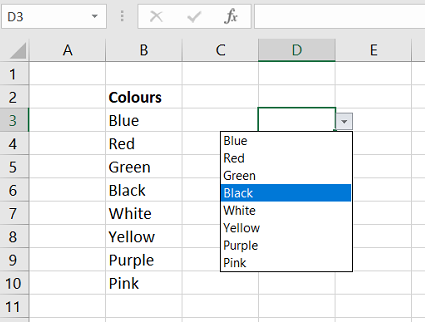
How can we add a dropdown list in Excel? What if we want the dropdown list to change depending on another cell value? In this article, we will go through how to add a dropdown list in Excel. We will also look at how to have a dropdown list that users can overwrite. In addition […]